4) Cluster Computing
- Former user (Deleted)
- Emma Barnes
Submitting R Scripts to the Cluster
Detailed instructions on managing cluster jobs can be found here
abs4@ecgberht$ cat simple.R
args <- commandArgs(trailingOnly = TRUE)
number=as.numeric(args[1])
string=args[2]
print(sprintf("R script called with arguments \'%s\' and \'%s\'", number, string))

abs4@ecgberht$ Rscript simple.R 96 "Hello World"
[1] "R script called with arguments '96' and 'Hello World'"
abs4@ecgberht$ more simple.job
#$ -cwd -V
#$ -l h_rt=0:15:00
#$ -o logs
#$ -e logs
#$ -N R_simple

echo `date`: executing R script simple on host ${HOSTNAME}
Rscript --no-save --no-restore simple.R 93 "The end of the world is not today" > simple.Rout
echo `date`: completed R script simple on host ${HOSTNAME}
abs4@ecgberht$ abs4@ecgberht$ qsub simple.job
Your job 711241 ("R_simple") has been submitted
abs4@ecgberht$ qstat
job-ID  prior   name       user         state submit/start at     queue                          slots ja-task-ID
-----------------------------------------------------------------------------------------------------------------
 711241 0.00000 R_simple   abs4         qw    11/19/2014 12:46:35                                    1
abs4@ecgberht$ more simple.Rout
[1] "R script called with arguments '93' and 'The end of the world is not today'"
abs4@ecgberht$
Asking for more resources
By default the grid engine gives each job 1 core and 1GB of memory. This unit of resource is known as a slot. In order to use the parallel features discussed in section 2) Using multiple cores via the parallel package you need to ask for additional slots (cores) and/or RAM.
To request say 16 cores use the directive:
#$ -pe smp 16
To request 4GB of memory:
#$ -l h_vmem=4G
The memory request is per slot, so combining both requests will give you 16 cores and 64GB of memory. Requesting more cores and/or memory that is available on the node will result in the job waiting indefinitely in the queue. See here for more information.
Array (Task) Jobs
Basic Use
You can use array jobs to submit a large number of jobs — likely auto-generated — to do the same processing on a lot of individual input datasets or values. Examples include image processing, or rendering, with one job for each frame in a sequence. Parameter sweeps, with each job running the same calculation with a different parameter set from a pre-defined collection, can also be performed.
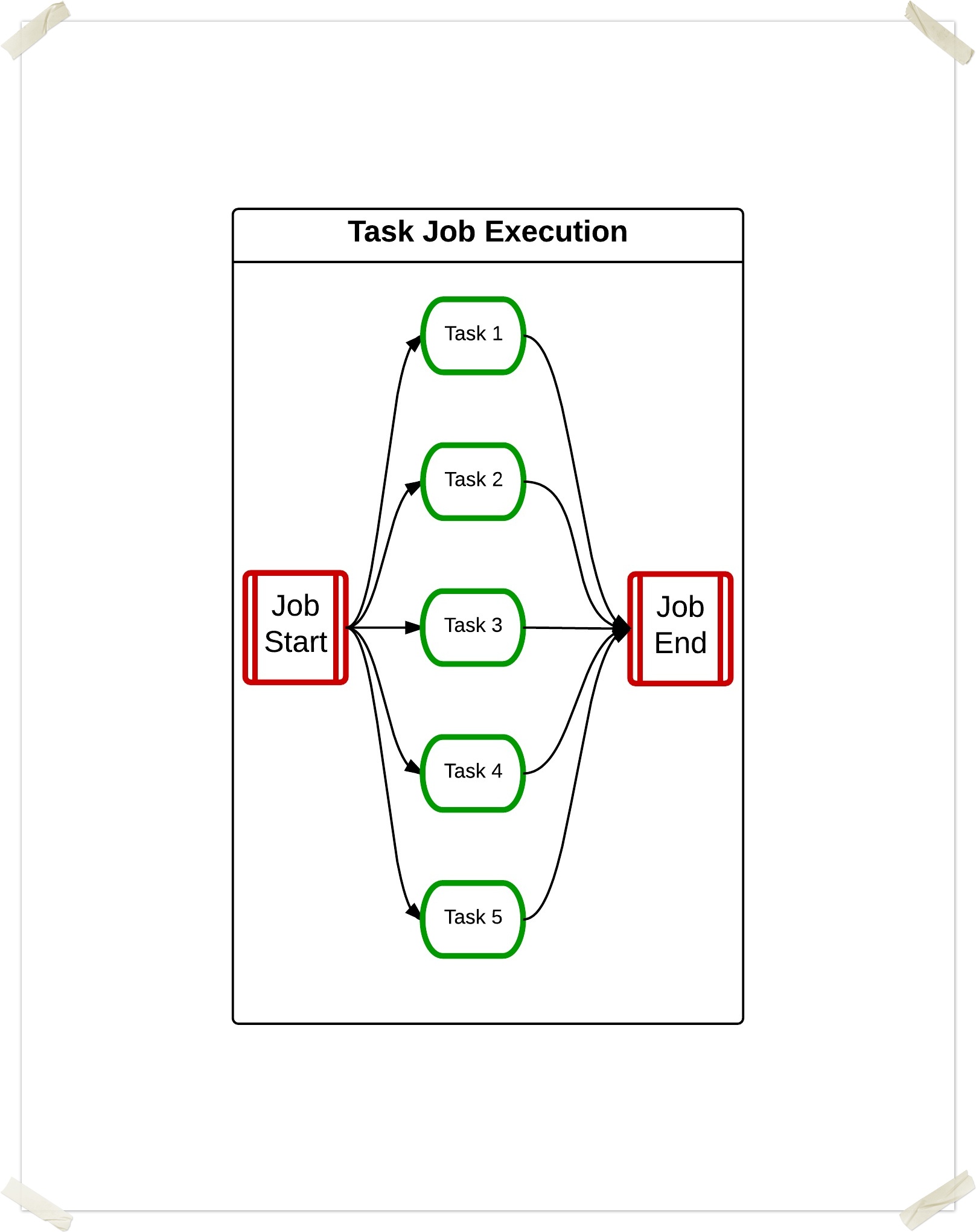
This diagram shows how the tasks are managed and executed. The first array job (red) has five tasks (green) executing - there may be more tasks waiting for execution.
.jpeg?version=1&modificationDate=1603972582000&cacheVersion=1&api=v2&width=900&height=761)
Array jobs effectively constitute a parallel loop over the input data which can be manipulated as a unit by the Slurm queue management commands, sbatch, and scancel. The jobs have have a single entry in squeue output when waiting, but runnng an entry for each running member of the array is shown. This makes management easier than generating and manipulating a large number of individual jobs.
Each instance of the job in the effective loop is called a task, which has an index exported to the task’s environment for use in the job script. The tasks may be parallel.
The following code shows a job description for an array job running 25 copies of the R script "createData.R". The parameter '-t 1:25' specifies the number of tasks to create. The script takes two parameters, the size of the file to be created and the filename. The variable ${SGE_TASK_ID} is used to create a unique filename. This variable is numeric and is assigned a sequentially incremented value based on when the task was created.
args <- commandArgs(trailingOnly = TRUE)
dSize=as.numeric(args[1])
dFile=args[2]

create.data.file <- function(size, filename)
{

  data <- rnorm(size);
  write(data, file = filename, append=FALSE);

}

create.data.file(dSize, dFile)
#$ -cwd -V
#$ -l h_rt=1:15:00
#$ -o logs
#$ -e logs
#$ -N R_createData
#$ -t 1-25

echo `date`: executing R create data module on host ${HOSTNAME}
Rscript createData.R 25000000 data/datafile.${SGE_TASK_ID}
echo `date`: completed R create data module on host ${HOSTNAME}
create.data.file(dSize, dFile)abs4@ecgberht$ qsub createData.job
Your job-array 711238.1-25:1 ("R_createData") has been submitted
abs4@ecgberht$ qstat
job-ID  prior   name       user         state submit/start at     queue                          slots ja-task-ID
-----------------------------------------------------------------------------------------------------------------
 711238 0.00000 R_createDa abs4         qw    11/19/2014 12:18:27                                    1 1-25:1
abs4@ecgberht$ qstat
job-ID  prior   name       user         state submit/start at     queue                          slots ja-task-ID
-----------------------------------------------------------------------------------------------------------------
 711238 0.55500 R_createDa abs4         r     11/19/2014 12:18:40 its-long@rnode2.york.ac.uk         1 1
 711238 0.55500 R_createDa abs4         r     11/19/2014 12:18:40 its-long@rnode0.york.ac.uk         1 2
 711238 0.55500 R_createDa abs4         r     11/19/2014 12:18:40 its-long@rnode4.york.ac.uk         1 3
 711238 0.55500 R_createDa abs4         r     11/19/2014 12:18:40 its-day@rnode17.york.ac.uk         1 4
 711238 0.55500 R_createDa abs4         r     11/19/2014 12:18:40 its-day@rnode16.york.ac.uk         1 5
 711238 0.55500 R_createDa abs4         r     11/19/2014 12:18:40 its-day@rnode9.york.ac.uk          1 6
 711238 0.55500 R_createDa abs4         r     11/19/2014 12:18:40 its-day@rnode14.york.ac.uk         1 7
 711238 0.55500 R_createDa abs4         r     11/19/2014 12:18:40 its-day@rnode15.york.ac.uk         1 8
 711238 0.55500 R_createDa abs4         r     11/19/2014 12:18:40 its-day@rnode20.york.ac.uk         1 9
 711238 0.55500 R_createDa abs4         r     11/19/2014 12:18:40 its-day@rnode18.york.ac.uk         1 10
 711238 0.55500 R_createDa abs4         r     11/19/2014 12:18:40 its-day@rnode19.york.ac.uk         1 11
 711238 0.55500 R_createDa abs4         r     11/19/2014 12:18:40 its-day@rnode7.york.ac.uk          1 12
 711238 0.55500 R_createDa abs4         r     11/19/2014 12:18:40 its-day@rnode21.york.ac.uk         1 13
 711238 0.55500 R_createDa abs4         r     11/19/2014 12:18:40 its-day@rnode11.york.ac.uk         1 14
 711238 0.55500 R_createDa abs4         r     11/19/2014 12:18:40 its-gpu@rnode6.york.ac.uk          1 15
 711238 0.55500 R_createDa abs4         r     11/19/2014 12:18:40 its-day@rnode8.york.ac.uk          1 16
 711238 0.55500 R_createDa abs4         r     11/19/2014 12:18:40 its-long@rnode1.york.ac.uk         1 17
 711238 0.55500 R_createDa abs4         r     11/19/2014 12:18:40 its-long@rnode3.york.ac.uk         1 18
 711238 0.55500 R_createDa abs4         r     11/19/2014 12:18:40 its-day@rnode11.york.ac.uk         1 19
 711238 0.55500 R_createDa abs4         r     11/19/2014 12:18:40 its-long@rnode0.york.ac.uk         1 20
 711238 0.55500 R_createDa abs4         r     11/19/2014 12:18:40 its-gpu@rnode6.york.ac.uk          1 21
 711238 0.55500 R_createDa abs4         r     11/19/2014 12:18:40 its-day@rnode21.york.ac.uk         1 22
 711238 0.55500 R_createDa abs4         r     11/19/2014 12:18:40 its-day@rnode7.york.ac.uk          1 23
 711238 0.55500 R_createDa abs4         r     11/19/2014 12:18:40 its-day@rnode19.york.ac.uk         1 24
 711238 0.55500 R_createDa abs4         r     11/19/2014 12:18:40 its-day@rnode18.york.ac.uk         1 25
abs4@ecgberht$ qstat
abs4@ecgberht$ ls -l data
total 6225728
-rw------- 1 abs4 csrv 253994863 Nov 19 12:20 datafile.1
-rw------- 1 abs4 csrv 254011505 Nov 19 12:20 datafile.10
-rw------- 1 abs4 csrv 254003260 Nov 19 12:20 datafile.11
-rw------- 1 abs4 csrv 253995252 Nov 19 12:20 datafile.12
-rw------- 1 abs4 csrv 254003817 Nov 19 12:20 datafile.13
-rw------- 1 abs4 csrv 254003548 Nov 19 12:20 datafile.14
-rw------- 1 abs4 csrv 253994947 Nov 19 12:20 datafile.15
-rw------- 1 abs4 csrv 253997381 Nov 19 12:20 datafile.16
-rw------- 1 abs4 csrv 254001350 Nov 19 12:20 datafile.17
-rw------- 1 abs4 csrv 254000042 Nov 19 12:20 datafile.18
-rw------- 1 abs4 csrv 253993076 Nov 19 12:20 datafile.19
-rw------- 1 abs4 csrv 253998375 Nov 19 12:20 datafile.2
-rw------- 1 abs4 csrv 253997415 Nov 19 12:20 datafile.20
-rw------- 1 abs4 csrv 254003162 Nov 19 12:20 datafile.21
-rw------- 1 abs4 csrv 254001136 Nov 19 12:20 datafile.22
-rw------- 1 abs4 csrv 253998621 Nov 19 12:20 datafile.23
-rw------- 1 abs4 csrv 254000813 Nov 19 12:20 datafile.24
-rw------- 1 abs4 csrv 253999557 Nov 19 12:20 datafile.25
-rw------- 1 abs4 csrv 254000352 Nov 19 12:20 datafile.3
-rw------- 1 abs4 csrv 254001415 Nov 19 12:20 datafile.4
-rw------- 1 abs4 csrv 254001743 Nov 19 12:20 datafile.5
-rw------- 1 abs4 csrv 253996849 Nov 19 12:20 datafile.6
-rw------- 1 abs4 csrv 253999499 Nov 19 12:20 datafile.7
-rw------- 1 abs4 csrv 254005345 Nov 19 12:20 datafile.8
-rw------- 1 abs4 csrv 253997331 Nov 19 12:20 datafile.9
abs4@ecgberht$ more logs/R_createData.o711238.17
Wed Nov 19 12:18:41 GMT 2014: executing R create data module on host rnode1
Wed Nov 19 12:20:09 GMT 2014: completed R create data module on host rnode1
abs4@ecgberht$
Array Indexing
The array stride can be a value other that 1. The following example executes four tasks, with id 1, 6, 11, 16
abs4@ecgberht$ cat createData_index.job
#$ -cwd -V
#$ -l h_rt=1:15:00
#$ -o logs
#$ -e logs
#$ -N R_createData
#$ -t 100-200:5

echo `date`: executing R create data module on host ${HOSTNAME}
Rscript createData.R 25000000 data/datafile.${SGE_TASK_ID}
echo `date`: completed R create data module on host ${HOSTNAME}
abs4@ecgberht$ qsub createData_index.job
Your job-array 711240.100-200:5 ("R_createData") has been submitted
abs4@ecgberht$ qstat
job-ID  prior   name       user         state submit/start at     queue                          slots ja-task-ID
-----------------------------------------------------------------------------------------------------------------
 711240 0.00000 R_createDa abs4         qw    11/19/2014 12:30:50                                    1 100-200:5
abs4@ecgberht$ qstat
job-ID  prior   name       user         state submit/start at     queue                          slots ja-task-ID
-----------------------------------------------------------------------------------------------------------------
 711240 0.55500 R_createDa abs4         r     11/19/2014 12:30:55 its-day@rnode14.york.ac.uk         1 100
 711240 0.55500 R_createDa abs4         r     11/19/2014 12:30:55 its-day@rnode11.york.ac.uk         1 105
 711240 0.55500 R_createDa abs4         r     11/19/2014 12:30:55 its-day@rnode16.york.ac.uk         1 110
 711240 0.55500 R_createDa abs4         r     11/19/2014 12:30:55 its-long@rnode2.york.ac.uk         1 115
 711240 0.55500 R_createDa abs4         r     11/19/2014 12:30:55 its-long@rnode3.york.ac.uk         1 120
 711240 0.55500 R_createDa abs4         r     11/19/2014 12:30:55 its-long@rnode1.york.ac.uk         1 125
 711240 0.55500 R_createDa abs4         r     11/19/2014 12:30:55 its-day@rnode20.york.ac.uk         1 130
 711240 0.55500 R_createDa abs4         r     11/19/2014 12:30:55 its-day@rnode18.york.ac.uk         1 135
 711240 0.55500 R_createDa abs4         r     11/19/2014 12:30:55 its-day@rnode9.york.ac.uk          1 140
 711240 0.55500 R_createDa abs4         r     11/19/2014 12:30:55 its-day@rnode21.york.ac.uk         1 145
 711240 0.55500 R_createDa abs4         r     11/19/2014 12:30:55 its-long@rnode4.york.ac.uk         1 150
 711240 0.55500 R_createDa abs4         r     11/19/2014 12:30:55 its-long@rnode0.york.ac.uk         1 155
 711240 0.55500 R_createDa abs4         r     11/19/2014 12:30:55 its-day@rnode15.york.ac.uk         1 160
 711240 0.55500 R_createDa abs4         r     11/19/2014 12:30:55 its-day@rnode7.york.ac.uk          1 165
 711240 0.55500 R_createDa abs4         r     11/19/2014 12:30:55 its-day@rnode19.york.ac.uk         1 170
 711240 0.55500 R_createDa abs4         r     11/19/2014 12:30:55 its-day@rnode8.york.ac.uk          1 175
 711240 0.55500 R_createDa abs4         r     11/19/2014 12:30:55 its-gpu@rnode6.york.ac.uk          1 180
 711240 0.55500 R_createDa abs4         r     11/19/2014 12:30:55 its-long@rnode5.york.ac.uk         1 185
 711240 0.55500 R_createDa abs4         t     11/19/2014 12:30:55 its-day@rnode11.york.ac.uk         1 190
 711240 0.55500 R_createDa abs4         t     11/19/2014 12:30:55 its-long@rnode0.york.ac.uk         1 195
 711240 0.55500 R_createDa abs4         t     11/19/2014 12:30:55 its-gpu@rnode6.york.ac.uk          1 200
abs4@ecgberht$ ls data
datafile.1    datafile.13   datafile.160  datafile.195  datafile.4
datafile.10   datafile.130  datafile.165  datafile.2    datafile.5
datafile.100  datafile.135  datafile.17   datafile.20   datafile.6
datafile.105  datafile.14   datafile.170  datafile.200  datafile.7
datafile.11   datafile.140  datafile.175  datafile.21   datafile.8
datafile.110  datafile.145  datafile.18   datafile.22   datafile.9
datafile.115  datafile.15   datafile.180  datafile.23
datafile.12   datafile.150  datafile.185  datafile.24
datafile.120  datafile.155  datafile.19   datafile.25
datafile.125  datafile.16   datafile.190  datafile.3
abs4@ecgberht$
The variables SGE_TASK_FIRST, SGE_TASK_LAST, and SGE_TASK_STEPSIZE provide the task range and stride to the script.
Dependent Arrays
The command qsub -hold_jid_add is used to hold an array job's tasks dependant on corresponding tasks. In the following example array task n of task_job2 will only run after task n of task_job1 has completed. Task n of task_job3 will only run after tasks n and n+1 of task_job2 have finished.
qsub -t 1-5 Job1
qsub -t 1-3 -hold_jid_ad Job1 Job2
qsub -t 1-5 -hold_jid_ad Job2 Job3
.jpeg?version=1&modificationDate=1603972582000&cacheVersion=1&api=v2&width=500&height=432)
Example Dependant Array Job
In the following example we are going to submit three jobs, "createData", "analyseData", and "summaryData". Each job is dependant on the previous job.
#$ -cwd -V
#$ -l h_rt=1:15:00
#$ -o logs
#$ -e logs
#$ -N R_createData
#$ -t 1-25

Rscript createData.R 25000000 data/datafile.${SGE_TASK_ID}
#$ -cwd -V
#$ -l h_rt=1:15:00
#$ -o logs
#$ -e logs
#$ -N R_analyseData
#$ -t 1-25

Rscript analyseData.R data/datafile.${SGE_TASK_ID} results/resultfile.${SGE_TASK_ID}
#$ -cwd -V
#$ -l h_rt=0:15:00
#$ -o logs
#$ -e logs
#$ -N R_summaryData

Rscript summaryData.R results/resultfile 25 >summary.txt
We now submit the three jobs Note how we use the job name specified with the "-N" command for the dependent jobs. If we did not use this we would have to use the filename of the job. The final job is a single task that collates all the dat files - we use the stepsize of 25 to force a single instance of the job. SGE requires that dependant jobs have the same number of tasks.
Note how tasks of the "R_analyseData" job can start when the corresponding "createData.job" has terminated.
abs4@ecgberht$ qsub createData.job
Your job-array 711320.1-25:1 ("R_createData") has been submitted
abs4@ecgberht$ qsub -hold_jid_ad R_createData analyseData.job
Your job-array 711321.1-25:1 ("R_analyseData") has been submitted
abs4@ecgberht$ qsub -t 1-25:25 -hold_jid_ad R_analyseData summaryData.job
Your job-array 711322.1-25:25 ("R_summaryData") has been submitted
abs4@ecgberht$ qstat
job-ID  prior   name       user         state submit/start at     queue                          slots ja-task-ID
-----------------------------------------------------------------------------------------------------------------
 711320 0.00000 R_createDa abs4         qw    11/21/2014 10:26:54                                    1 1-25:1
 711321 0.00000 R_analyseD abs4         hqw   11/21/2014 10:26:54                                    1 1-25:1
 711322 0.00000 R_summaryD abs4         hqw   11/21/2014 10:26:54                                    1 1

abs4@ecgberht$ qstat
job-ID  prior   name       user         state submit/start at     queue                          slots ja-task-ID
-----------------------------------------------------------------------------------------------------------------
 711320 0.50500 R_createDa abs4         r     11/21/2014 10:26:55 its-long@rnode1.york.ac.uk         1 1
 711320 0.50500 R_createDa abs4         r     11/21/2014 10:26:55 its-day@rnode21.york.ac.uk         1 2
 711320 0.50500 R_createDa abs4         r     11/21/2014 10:26:55 its-long@rnode4.york.ac.uk         1 3
 711320 0.50500 R_createDa abs4         r     11/21/2014 10:26:55 its-day@rnode9.york.ac.uk          1 4
 711320 0.50500 R_createDa abs4         r     11/21/2014 10:26:55 its-day@rnode14.york.ac.uk         1 5
 711320 0.50500 R_createDa abs4         r     11/21/2014 10:26:55 its-day@rnode16.york.ac.uk         1 6
 711320 0.50500 R_createDa abs4         r     11/21/2014 10:26:55 its-day@rnode17.york.ac.uk         1 7
 711320 0.50500 R_createDa abs4         r     11/21/2014 10:26:55 its-day@rnode19.york.ac.uk         1 8
 711320 0.50500 R_createDa abs4         r     11/21/2014 10:26:55 its-long@rnode3.york.ac.uk         1 9
 711320 0.50500 R_createDa abs4         r     11/21/2014 10:26:55 its-day@rnode20.york.ac.uk         1 10
 711320 0.50500 R_createDa abs4         r     11/21/2014 10:26:55 its-day@rnode8.york.ac.uk          1 11
 711320 0.50500 R_createDa abs4         r     11/21/2014 10:26:55 its-long@rnode2.york.ac.uk         1 12
 711320 0.50500 R_createDa abs4         r     11/21/2014 10:26:55 its-gpu@rnode6.york.ac.uk          1 13
 711320 0.50500 R_createDa abs4         r     11/21/2014 10:26:55 its-day@rnode15.york.ac.uk         1 14
 711320 0.50500 R_createDa abs4         r     11/21/2014 10:26:55 its-day@rnode11.york.ac.uk         1 15
 711320 0.50500 R_createDa abs4         r     11/21/2014 10:26:55 its-day@rnode18.york.ac.uk         1 16
 711320 0.50500 R_createDa abs4         r     11/21/2014 10:26:55 its-long@rnode5.york.ac.uk         1 17
 711320 0.50500 R_createDa abs4         r     11/21/2014 10:26:55 its-day@rnode7.york.ac.uk          1 18
 711320 0.50500 R_createDa abs4         r     11/21/2014 10:26:55 its-day@rnode11.york.ac.uk         1 19
 711320 0.50500 R_createDa abs4         r     11/21/2014 10:26:55 its-gpu@rnode6.york.ac.uk          1 20
 711320 0.50500 R_createDa abs4         r     11/21/2014 10:26:55 its-day@rnode21.york.ac.uk         1 21
 711320 0.50500 R_createDa abs4         r     11/21/2014 10:26:55 its-day@rnode14.york.ac.uk         1 22
 711320 0.50500 R_createDa abs4         r     11/21/2014 10:26:55 its-day@rnode9.york.ac.uk          1 23
 711320 0.50500 R_createDa abs4         r     11/21/2014 10:26:55 its-day@rnode16.york.ac.uk         1 24
 711320 0.50500 R_createDa abs4         r     11/21/2014 10:26:55 its-day@rnode17.york.ac.uk         1 25
 711321 0.00000 R_analyseD abs4         hqw   11/21/2014 10:26:54                                    1 1-25:1
 711322 0.00000 R_summaryD abs4         hqw   11/21/2014 10:26:54                                    1

abs4@ecgberht$ qstat
job-ID  prior   name       user         state submit/start at     queue                          slots ja-task-ID
-----------------------------------------------------------------------------------------------------------------
 711320 0.50500 R_createDa abs4         r     11/21/2014 10:26:55 its-day@rnode9.york.ac.uk          1 4
 711320 0.50500 R_createDa abs4         r     11/21/2014 10:26:55 its-gpu@rnode6.york.ac.uk          1 13
 711320 0.50500 R_createDa abs4         r     11/21/2014 10:26:55 its-day@rnode11.york.ac.uk         1 15
 711320 0.50500 R_createDa abs4         r     11/21/2014 10:26:55 its-gpu@rnode6.york.ac.uk          1 20
 711320 0.50500 R_createDa abs4         r     11/21/2014 10:26:55 its-day@rnode17.york.ac.uk         1 25
 711321 0.50500 R_analyseD abs4         r     11/21/2014 10:28:25 its-day@rnode20.york.ac.uk         1 1
 711321 0.50500 R_analyseD abs4         r     11/21/2014 10:28:25 its-day@rnode18.york.ac.uk         1 3
 711321 0.50500 R_analyseD abs4         r     11/21/2014 10:28:25 its-day@rnode7.york.ac.uk          1 9
 711321 0.50500 R_analyseD abs4         r     11/21/2014 10:28:25 its-long@rnode1.york.ac.uk         1 10
 711321 0.50500 R_analyseD abs4         r     11/21/2014 10:28:25 its-long@rnode4.york.ac.uk         1 11
 711321 0.50500 R_analyseD abs4         r     11/21/2014 10:28:25 its-long@rnode3.york.ac.uk         1 12
 711321 0.50500 R_analyseD abs4         r     11/21/2014 10:28:25 its-day@rnode15.york.ac.uk         1 14
 711321 0.50500 R_analyseD abs4         r     11/21/2014 10:28:25 its-day@rnode8.york.ac.uk          1 16
 711321 0.50500 R_analyseD abs4         r     11/21/2014 10:28:25 its-long@rnode2.york.ac.uk         1 17
 711321 0.50500 R_analyseD abs4         r     11/21/2014 10:28:25 its-long@rnode5.york.ac.uk         1 18
 711321 0.50500 R_analyseD abs4         r     11/21/2014 10:28:25 its-day@rnode11.york.ac.uk         1 21
 711321 0.00000 R_analyseD abs4         qw    11/21/2014 10:26:54                                    1 2,5,6-8:1,19,22,23,24
 711321 0.00000 R_analyseD abs4         hqw   11/21/2014 10:26:54                                    1 4,13,15,20,25
 711322 0.00000 R_summaryD abs4         hqw   11/21/2014 10:26:54                                    1 1
abs4@ecgberht$
Selecting irregular file names in array jobs
Often your data files can not be referenced via a unique numerical index - the file names will be dates or unrelated strings. This example demonstrates processing a set of files with no numerical index. We first make a file containing a list of the filenames. A short "awk" script returns the line as indexed by the numerical argument.
abs4@ecgberht$ ls idata/
Wed Nov 19 14:22:26 GMT 2014  Wed Nov 19 14:25:14 GMT 2014
Wed Nov 19 14:22:32 GMT 2014  Wed Nov 19 14:25:21 GMT 2014
Wed Nov 19 14:22:37 GMT 2014  Wed Nov 19 14:25:28 GMT 2014
Wed Nov 19 14:22:45 GMT 2014  Wed Nov 19 14:25:36 GMT 2014
Wed Nov 19 14:22:52 GMT 2014  Wed Nov 19 14:25:43 GMT 2014
Wed Nov 19 14:23:00 GMT 2014  Wed Nov 19 14:25:51 GMT 2014
Wed Nov 19 14:23:07 GMT 2014  Wed Nov 19 14:25:58 GMT 2014
Wed Nov 19 14:23:15 GMT 2014  Wed Nov 19 14:26:06 GMT 2014
Wed Nov 19 14:23:22 GMT 2014  Wed Nov 19 14:26:13 GMT 2014
Wed Nov 19 14:23:29 GMT 2014  Wed Nov 19 14:26:20 GMT 2014
Wed Nov 19 14:23:37 GMT 2014  Wed Nov 19 14:26:28 GMT 2014
Wed Nov 19 14:23:44 GMT 2014  Wed Nov 19 14:26:35 GMT 2014
Wed Nov 19 14:23:52 GMT 2014  Wed Nov 19 14:26:43 GMT 2014
Wed Nov 19 14:23:59 GMT 2014  Wed Nov 19 14:26:50 GMT 2014
Wed Nov 19 14:24:07 GMT 2014  Wed Nov 19 14:26:57 GMT 2014
Wed Nov 19 14:24:14 GMT 2014  Wed Nov 19 14:27:05 GMT 2014
Wed Nov 19 14:24:21 GMT 2014  Wed Nov 19 14:27:12 GMT 2014
Wed Nov 19 14:24:29 GMT 2014  Wed Nov 19 14:27:20 GMT 2014
Wed Nov 19 14:24:36 GMT 2014  Wed Nov 19 14:27:27 GMT 2014
Wed Nov 19 14:24:44 GMT 2014  Wed Nov 19 14:27:35 GMT 2014
Wed Nov 19 14:24:51 GMT 2014  Wed Nov 19 14:27:42 GMT 2014
Wed Nov 19 14:24:59 GMT 2014  Wed Nov 19 14:27:50 GMT 2014
Wed Nov 19 14:25:06 GMT 2014  Wed Nov 19 14:27:57 GMT 2014
abs4@ecgberht$ ls -1 idata/ > data.files
abs4@ecgberht$ cat data.files
Wed Nov 19 14:22:26 GMT 2014
Wed Nov 19 14:22:32 GMT 2014
Wed Nov 19 14:22:37 GMT 2014
Wed Nov 19 14:22:45 GMT 2014
Wed Nov 19 14:22:52 GMT 2014
Wed Nov 19 14:23:00 GMT 2014
Wed Nov 19 14:23:07 GMT 2014
Wed Nov 19 14:23:15 GMT 2014
Wed Nov 19 14:23:22 GMT 2014
Wed Nov 19 14:23:29 GMT 2014
Wed Nov 19 14:23:37 GMT 2014
Wed Nov 19 14:23:44 GMT 2014
Wed Nov 19 14:23:52 GMT 2014
Wed Nov 19 14:23:59 GMT 2014
Wed Nov 19 14:24:07 GMT 2014
Wed Nov 19 14:24:14 GMT 2014
Wed Nov 19 14:24:21 GMT 2014
Wed Nov 19 14:24:29 GMT 2014
Wed Nov 19 14:24:36 GMT 2014
Wed Nov 19 14:24:44 GMT 2014
Wed Nov 19 14:24:51 GMT 2014
Wed Nov 19 14:24:59 GMT 2014
Wed Nov 19 14:25:06 GMT 2014
Wed Nov 19 14:25:14 GMT 2014
Wed Nov 19 14:25:21 GMT 2014
Wed Nov 19 14:25:28 GMT 2014
Wed Nov 19 14:25:36 GMT 2014
Wed Nov 19 14:25:43 GMT 2014
Wed Nov 19 14:25:51 GMT 2014
Wed Nov 19 14:25:58 GMT 2014
Wed Nov 19 14:26:06 GMT 2014
Wed Nov 19 14:26:13 GMT 2014
Wed Nov 19 14:26:20 GMT 2014
Wed Nov 19 14:26:28 GMT 2014
Wed Nov 19 14:26:35 GMT 2014
Wed Nov 19 14:26:43 GMT 2014
Wed Nov 19 14:26:50 GMT 2014
Wed Nov 19 14:26:57 GMT 2014
Wed Nov 19 14:27:05 GMT 2014
Wed Nov 19 14:27:12 GMT 2014
Wed Nov 19 14:27:20 GMT 2014
Wed Nov 19 14:27:27 GMT 2014
Wed Nov 19 14:27:35 GMT 2014
Wed Nov 19 14:27:42 GMT 2014
Wed Nov 19 14:27:50 GMT 2014
Wed Nov 19 14:27:57 GMT 2014
abs4@ecgberht$ more analyse_irr_Data.job
#$ -cwd -V
#$ -l h_rt=1:15:00
#$ -o logs
#$ -e logs
#$ -N R_analyse_I_Data
#$ -t 1-25
filename=$(awk NR==$SGE_TASK_ID data.files)
Rscript analyseData.R "idata/$filename" "results/$filename.rst"
abs4@ecgberht$